
Stripe failed payments: why they fail and how to recover them
Why Stripe subscription payments fail, how Smart Retries and failed-payment emails win them back, and what happens to the subscription when the retries run out.

A Stripe payment fails for one of three reasons: the customer’s bank declines it, Stripe blocks it as too risky, or the payment request itself is invalid. When a subscription’s renewal payment fails, Stripe marks the subscription past due and retries the payment on a schedule. Smart Retries, on by default for new accounts, makes up to 8 retries within 2 weeks. Stripe can also email the customer after each failure. When the retries run out, your settings decide whether the subscription is canceled, marked unpaid, left past due, or paused.
Why a Stripe payment fails
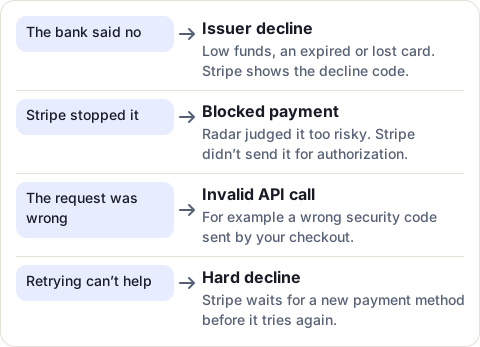
- Issuer declines. The card issuer’s systems refuse the charge, for example for low funds, an expired card or a card reported lost. Stripe passes on the reason it receives as a decline code.
- Blocked payments. Stripe Radar blocks payments it scores as high risk, or that break a rule you set. Stripe doesn’t ask the card issuer to authorize a blocked payment, so no money is taken.
- Invalid API calls. The request sent to Stripe was wrong, such as a security code that doesn’t match.
To see why one payment failed, open it in the Stripe Dashboard: its details show the type of failure and, for a bank decline, the decline code. Some declines are hard declines, such as a revoked authorization or a transaction the card doesn’t allow. Retrying those can’t succeed: Stripe keeps the retries on the schedule but only runs them once the customer adds a new payment method.
What happens to the subscription
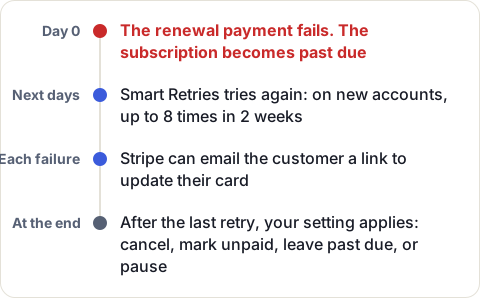
When a renewal payment fails, the subscription becomes past due. Stripe keeps creating invoices and retries the payment on your schedule. When the last retry fails, the subscription does what you chose in your settings:
- Cancel the subscription. It becomes canceled.
- Mark it unpaid. It stays in place, but Stripe stops trying to charge. New invoices are created as drafts. Stripe advises you to cut off access to your product while a subscription is unpaid.
- Leave it past due. Invoices keep being created and charged on your retry settings.
- Pause it, if the subscription can be paused. Stripe creates no new invoices until it resumes.
The very first payment of a new subscription works differently. If it fails, the subscription is incomplete, and the customer has 23 hours to pay. Smart Retries and custom retry rules don’t retry this first payment, so your checkout has to ask the customer again. After 23 hours, the subscription becomes incomplete_expired and won’t bill them.
A failed payment doesn’t lower your MRR straight away: a past-due subscription still counts. It leaves MRR when it is canceled, marked unpaid or paused. More in how to calculate MRR from your Stripe subscriptions.
Set up retries
For subscriptions, go to Billing > Revenue recovery > Retries in the Stripe Dashboard.
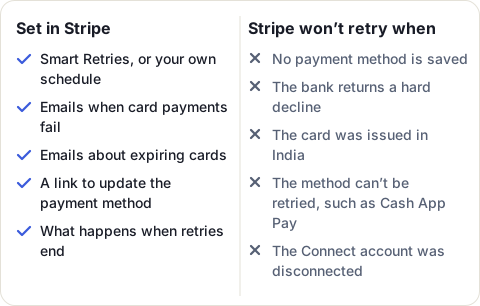
- Choose Smart Retries or your own schedule. Smart Retries picks the moment of each retry from signals Stripe sees across payments. You choose how many retries, within 1 week, 2 weeks, 3 weeks, 1 month or 2 months. A custom schedule allows up to three retries, each a set number of days after the one before.
- Choose what happens when the retries end, in your failed payment settings: cancel, mark unpaid, leave past due, or pause.
Stripe doesn’t retry when there is no payment method, after a hard decline, for India-issued cards, when a Stripe Connect account has been disconnected, or for methods that can’t be retried, such as Cash App Pay and Amazon Pay. Direct Debit payments have retry settings of their own.
When a customer gives you a new card after a failure, put it where the failed payment came from. Stripe retries with the subscription’s own default payment method first, then the customer’s default. If the subscription has its own default payment method and you update only the customer’s, Stripe keeps retrying the old card.
Tell the customer, and let them fix it
Some failures need the customer to act, for example to replace an expired card. Stripe can ask them for you, from its revenue recovery and email settings in the Dashboard:
- Send emails when card payments fail. Stripe emails the customer after each failed payment, with a link to update their payment method.
- Send emails about expiring cards. Sent 1 month before their card on file expires.
- The link’s destination: a page hosted by Stripe, or your own subscription page.
The link stops working once the subscription is canceled, unpaid or expired, or once its current billing period has ended, so the emails matter most early. Stripe can also update a customer’s card details automatically when they get a new card number.
Keep an eye on failed payments
Stripe’s recovery analytics show your subscription payment failure and recovery rates, and the recent failed payments of your top customers. If you build your own alerts, the invoice.payment_failed event tells you each time a payment fails, and its attempt_count how many tries so far.
The people who can save a failing customer are often not in Stripe: your account managers and success team work in your CRM. If that CRM is HubSpot, MRR Sync, our app, writes each customer’s subscription status (such as Past due or Unpaid), a Payment failed flag and the number of failed attempts on their HubSpot company and contact. Your team can then build a list or a workflow of customers whose payment is failing, and call them before the retries run out.
Sources
- Stripe Docs: Declines, read 20 November 2026
- Stripe Docs: Automate payment retries, read 20 November 2026
- Stripe Docs: Automate customer emails, read 20 November 2026
- Stripe Docs: Revenue recovery, read 20 November 2026
- Stripe Docs: Subscriptions overview, read 20 November 2026
- Stripe Support: Understanding MRR and ARR, read 20 November 2026
Frequently asked questions
Does Stripe retry failed payments?
Yes, for subscription and invoice payments. Smart Retries is on by default for new Stripe accounts, with up to 8 retries within 2 weeks. You can change the count and window, or set your own schedule of up to three retries.
What happens if a Stripe subscription payment fails?
If a renewal payment fails, the subscription becomes past due and Stripe retries the payment on your schedule. After the last retry, your settings decide whether it is canceled, marked unpaid, left past due, or paused.
Does Stripe email customers when a payment fails?
It can. Turn on Send emails when card payments fail, and Stripe emails the customer after each failed payment with a link to update their payment method.
Why did my customer's Stripe payment fail?
Either the card issuer declined it, Stripe blocked it as too risky, or the payment request was invalid. The payment's details in the Dashboard show the type of failure and, for a bank decline, the decline code.
Can Stripe retry a hard decline?
No. After a hard decline, such as a revoked authorization, Stripe keeps the retries scheduled but only runs them once the customer adds a new payment method.