
How to connect Stripe to HubSpot, and what each option syncs
HubSpot's three ways to work with Stripe, the free data sync app, Stripe as payment processor and moving subscriptions into HubSpot, and what each one syncs.

HubSpot works with Stripe in three ways, each set up from HubSpot: the free Stripe data sync app, which copies Stripe customers, invoices and products into HubSpot; Stripe as HubSpot’s payment processor, so you can take payments from HubSpot quotes, invoices and payment links; and a migration that moves your Stripe subscriptions into HubSpot’s own billing. Which one you want depends on whether your subscriptions should stay in Stripe.
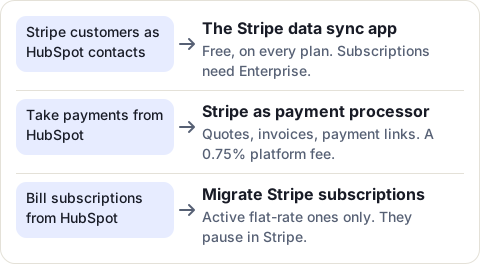
Option 1: the Stripe data sync app
This is the app most people mean by “the HubSpot Stripe integration”. It is built by HubSpot, costs nothing, and installs on every HubSpot plan. It doesn’t process any payment: it copies data.
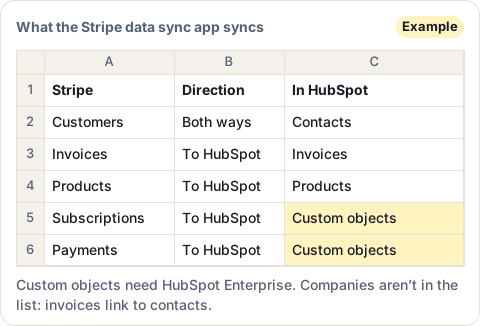
- Customers and contacts sync both ways, matched by email.
- Invoices and products come from Stripe to HubSpot.
- Subscriptions and payment transactions go to custom objects, which need a HubSpot Enterprise subscription.
- Companies aren’t in the list. The sync links invoices to contacts; to see them on a company, you associate them by hand.
The app comes with default field mappings. Custom field mappings need a Data Hub subscription.
Install the Stripe data sync app
You need to be a Super Admin, or have App Marketplace permissions.
- In HubSpot, click the Marketplace icon in the top bar, then HubSpot Marketplace.
- Search for Stripe, open the app built by HubSpot, and click Install.
- Click Next, log in to your Stripe account, review the access it asks for, and click Allow.
- In Settings > Integrations > Connected Apps, click the app, then Set up your sync.
- Pick the objects to sync, the direction, the field mappings and any filters, then click Save and sync.
The first sync copies your existing records, and HubSpot emails you when it is done. After that, a change syncs within 10 minutes. The CRM syncs tab of the app shows the records in sync, failing or excluded, and why.
Option 2: Stripe as HubSpot’s payment processor
This one goes the other way. You keep selling from HubSpot, and Stripe collects the money, by card (and by bank debit in some countries), on HubSpot quotes, invoices, payment links, contracts and subscriptions.
- In HubSpot, click More, then Revenue > Payments.
- Click Set up payments, select Integrate with a Stripe payment processing account, and click Next.
- Pick your country, accept the terms, and log in to Stripe to connect your account.
Before you choose it, know that:
- HubSpot charges a 0.75% platform fee on these payments, and other fees may apply.
- Invoices and subscriptions you create in HubSpot are not created in Stripe. Your existing Stripe customers, subscriptions and webhooks stay as they are.
- One HubSpot account takes one Stripe account, and the other way round.
- It isn’t available in some countries, including Brazil, India and South Africa. HubSpot’s page lists them all.
- You need Super Admin, or the Manage payments and subscriptions permission. Quotes also need a Revenue Hub seat.
Option 3: move your Stripe subscriptions into HubSpot
If you want HubSpot to bill your subscriptions, HubSpot can migrate them from Stripe. Once moved, each subscription is a HubSpot record with Monthly recurring revenue and Annual recurring revenue properties. You can see it on the contact and company, and its status turns to Unpaid when a payment fails. In other words, HubSpot does show MRR, for the subscriptions it bills.
The migration only takes some subscriptions:
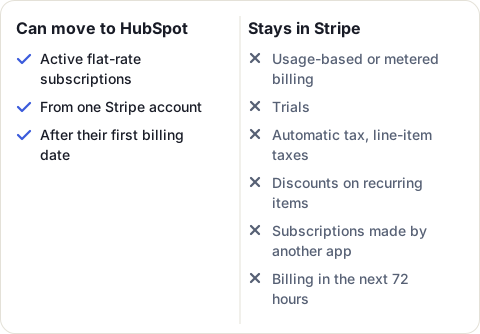
You need to be a Super Admin. The subscriptions you migrate are paused in Stripe, not deleted, so you can go back. The migration usually takes under an hour. For more than 1,000 subscriptions, HubSpot asks you to fill in a request form. To use HubSpot payments instead of Stripe for the payments, your business must be in the United States, the United Kingdom or Canada, with a paid HubSpot subscription.
If your subscriptions stay in Stripe
You may want to keep billing in Stripe because your checkout, trials, coupons, usage-based prices or Stripe Tax are built there, and some of those can’t be migrated. On a HubSpot plan below Enterprise, the data sync app then gives you contacts, invoices and products, but no subscription status, plan or MRR on the company your sales team opens.
For that, you need an app that reads your Stripe subscriptions and writes them onto HubSpot records. HubSpot’s App Marketplace lists several. MRR Sync, ours, reads Stripe with read-only access, and writes each customer’s subscription status, plan, MRR, ARR, next renewal, trial end, last payment and failed payments onto their HubSpot company and contact, on every HubSpot plan. It never creates records in HubSpot: it fills in the ones you have.
Sources
- HubSpot Knowledge Base: Use Stripe with HubSpot, read 20 November 2026
- HubSpot Marketplace: Stripe (data sync listing), read 20 November 2026
- HubSpot Knowledge Base: Connect and use HubSpot data sync, read 20 November 2026
- HubSpot Knowledge Base: Connect your Stripe account as a payment processor in HubSpot, read 20 November 2026
- HubSpot Knowledge Base: Migrate Stripe subscriptions to HubSpot, read 20 November 2026
- HubSpot Knowledge Base: Manage subscriptions, read 20 November 2026
Frequently asked questions
Does HubSpot integrate with Stripe?
Yes, in three ways: the free Stripe data sync app, Stripe as HubSpot's payment processor, and a migration that moves Stripe subscriptions into HubSpot's own billing.
Is the HubSpot Stripe integration free?
The Stripe data sync app costs nothing and works on every HubSpot plan. Using Stripe as HubSpot's payment processor adds a 0.75% platform fee on top of Stripe's own fees.
Can I sync Stripe subscriptions to HubSpot?
With the data sync app, subscriptions go to custom objects, which need HubSpot Enterprise. On other plans, HubSpot can bill the subscriptions itself if you migrate them, but only active flat-rate ones.
How often does the HubSpot Stripe sync update?
After the first full sync, a change syncs within 10 minutes. HubSpot emails you when that first sync is done.
Can I connect two Stripe accounts to HubSpot?
Not as payment processors: a HubSpot account takes one Stripe account, and a Stripe account connects to one HubSpot account. Subscription migration also works from one Stripe account only.