
How to calculate MRR from your Stripe subscriptions
The MRR formula, and how Stripe counts yearly plans, trials, discounts, taxes, usage and failed payments on its Billing overview, so you can match its number.

To calculate MRR from Stripe, take every active and past-due subscription, convert its recurring price to one month (a yearly price divided by 12, a quarterly one by 3), and add them up. Leave out taxes, free plans, trials and usage-based prices. That is the core of how Stripe counts MRR on its Billing overview; the rules below, on discounts and cancellations, close the rest of the gap.
The formula
MRR is the sum of each subscription’s recurring price, brought to one month:
- Monthly plans: the price as it is.
- Yearly plans: the price divided by 12. A $1,200 yearly plan adds $100 of MRR.
- Quarterly plans: the price divided by 3.
- Quantities: a plan billed per seat counts the price times the seats.
- Every few months or years: divide by the full length of the period. In Stripe’s data, a quarterly price is a monthly interval with an interval count of 3.
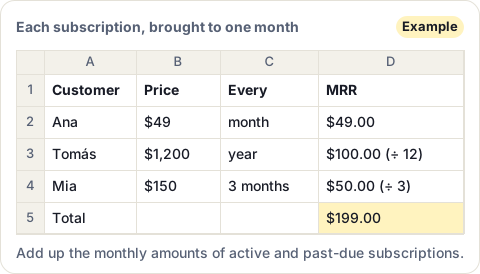
Stripe’s own example: 100 subscribers on a $100 monthly plan and 50 on a $600 yearly plan give (100 × $100) + (50 × $600 ÷ 12) = $12,500 of MRR.
What Stripe counts, and what it leaves out
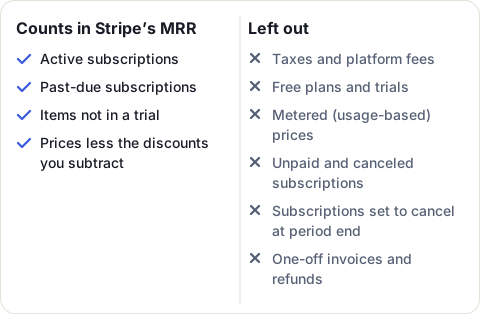
The formula is simple. The rules about which subscriptions count are where two people get different numbers. Stripe’s are these:
- Status: active and past-due subscriptions count. A past-due one keeps counting while Stripe retries the payment. Once a subscription is canceled or marked unpaid, Stripe treats it as churn and drops it.
- Trials: a subscription in a free trial adds nothing. If you use trial offers on single items, only the items in a trial are left out. When a trial ends and the subscription becomes active, it counts, even if the first invoice isn’t paid yet.
- Taxes and fees: never counted. Neither are platform fees (
application_fee). - Free plans: never counted.
- Usage-based prices: metered prices are left out, because usage changes from month to month. Stripe runs a Usage MRR preview for businesses that want them counted.
- Discounts: your choice (next section).
- Cancellations at period end: a subscription set to cancel at the end of its period leaves MRR as soon as the cancellation is scheduled, not on the day it ends.
- Refunds and one-off invoices: a one-off refund doesn’t change MRR, unless it comes from a change in the plan’s price. One-off invoices don’t count either.
Discounts: gross or net MRR
Stripe lets you decide how coupons affect MRR. On the Billing overview page, click Configure, then turn on either or both:
- Subtract recurring discounts from MRR, for coupons that apply to every invoice for a time.
- Subtract one-time discounts from MRR, for coupons used once.
Permanent recurring discounts are always subtracted, whatever you choose. Stripe calls subtracting discounts the more conservative choice, because it reflects more closely what these customers are worth today. Stripe takes 24 to 48 hours to show a changed setting. If someone else in your team reports MRR from a spreadsheet, agree on one choice, or the two numbers won’t match.
Why adding up invoices doesn’t give MRR
It is tempting to add up last month’s paid invoices. Stripe explains why that gives a different number: MRR looks forward, at what your subscriptions will keep bringing in, while invoices record what was billed.
- A yearly plan bills $1,200 once. Invoices show $1,200 in one month and nothing in the next eleven. MRR shows $100 every month.
- A one-off invoice, such as a setup fee, shows up in invoices but will not come back.
- Taxes are on the invoice but not in MRR.
How MRR changes from one month to the next
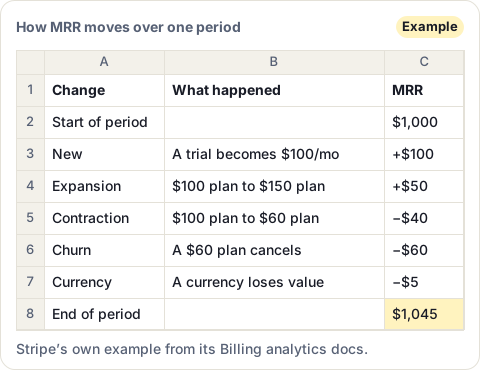
Stripe splits every change in MRR into a few kinds, and shows them on the Billing overview:
- New: a new paid subscription, or a trial or free plan that becomes paid.
- Expansion: an upgrade, more seats, or a smaller discount.
- Contraction: a downgrade, fewer seats, or a bigger discount.
- Churn: a subscription canceled, downgraded to free, or marked unpaid.
- Reactivation: a customer who had churned pays again.
- Currency: a customer paying in another currency is worth more or less after exchange rates move.
Where to read MRR in Stripe
- Billing overview in the Stripe Dashboard shows MRR, MRR growth and the changes above, with the settings you chose under Configure.
- Report downloads, on the same page in live mode, gives the figures as files.
- Stripe’s Metrics API, in preview, also returns MRR, as
revenue.mrr, if you want it in your own tools.
If you calculate MRR yourself, from an export or the API, apply the same rules: active and past-due subscriptions only, minus those set to cancel, prices brought to a month, no taxes, trials or metered prices, and the same discount setting as your Billing overview. One more cause of small gaps: Stripe’s downloaded reports date things in UTC, while its charts use your account’s time zone, so monthly totals might not match exactly.
MRR per customer, where your sales team works
Stripe gives you the total. Your sales and success teams usually need each customer’s MRR on their own record, to see who is worth a call before a renewal. MRR Sync, our app for teams that bill with Stripe and work in HubSpot, uses the same core rules for each Stripe customer: active and past-due subscriptions, yearly plans divided by 12, metered prices and trials left out, recurring discounts subtracted and one-time ones not. One difference: a subscription set to cancel at the end of its period keeps its MRR until it ends. Then it writes the result, with the plan and status, on the matching HubSpot company and contact.
Sources
- Stripe Docs: Analytics, read 20 November 2026
- Stripe Support: Understanding Monthly Recurring Revenue (MRR) and Annual Recurring Revenue (ARR), read 20 November 2026
- Stripe Docs: Supported metrics, read 20 November 2026
Frequently asked questions
How does Stripe calculate MRR?
Stripe adds up the monthly-normalized value of all active and past-due subscriptions. It leaves out taxes, free plans, trials and metered (usage-based) prices.
Do trials count in MRR?
No. A subscription in a free trial adds nothing until the trial ends and it becomes active. With trial offers on single items, only the items in a trial are left out.
Does a failed payment lower MRR?
Not at first. A past-due subscription keeps counting while Stripe retries. If your last retry step cancels it, it leaves MRR then. If that step marks it unpaid, Stripe drops it when the next invoice is generated.
Is MRR gross or net of discounts?
In Stripe, you choose. The Billing overview's Configure button lets you subtract recurring discounts, one-time discounts, or both. Permanent recurring discounts are always subtracted. Taxes are never counted.
Where do I find MRR in Stripe?
On the Billing overview page of the Stripe Dashboard. Stripe's Metrics API also returns it as revenue.mrr.