
Supabase authentication in TypeScript: two safe ways, with code
How to handle authentication with Supabase in TypeScript: which key goes where, how to lock your tables, and copy-ready code for sign-in, sessions and Supabase Auth.

There are two safe ways to handle authentication with Supabase. Either your own sign-in keeps your users, and only your server talks to Supabase, with the secret key, on tables the browser can’t reach at all. Or Supabase Auth keeps your users, the browser talks to Supabase with the public key, and Row Level Security policies decide what each user may touch. This guide gives you the code for both, ready to copy.
Every code file below has three buttons. Copy puts the code on your clipboard, Raw opens it as a plain-text file, and External opens it on a page of its own. Every key in the code is a placeholder: your real keys go in environment variables, never in the code.
Before you start
- A Supabase project. You need its URL and its keys, from Settings > API Keys.
- Node.js 22.18 or later. From that version Node.js runs
.tsfiles directly, by removing the types before it runs them: type stripping is on by default there. The code uses only what Node.js has built in:crypto,fetch,RequestandResponse. - For Way 1, an OAuth app at the service your users sign in with (Google, GitHub, Microsoft or another OAuth 2.0 provider): its client id, its client secret, and a redirect URI set to your callback, for example
https://app.example.com/api/auth/callback. No npm package is needed. - Packages. Way 1 needs none at run time. Way 2 needs the two Supabase packages. TypeScript and the Node.js types are only for checking your code: Node.js doesn’t check types itself. The code was checked against these versions:
npm install @supabase/supabase-js@2.119.2 @supabase/ssr@0.12.7
npm install -D typescript@7.0.2 @types/node@26.6.6- A
tsconfig.json. Every file below typechecks in strict mode with TypeScript 7.0.2 and these settings.allowImportingTsExtensionslets files import each other as./session.ts, which is how Node.js runs them.erasableSyntaxOnlyandverbatimModuleSyntaxkeep to what type stripping can remove.skipLibCheckis on because TypeScript 7.0.2 reports an error inside the type files of@supabase/auth-jsitself; it doesn’t hide errors in your own code.
{
  "compilerOptions": {
    "target": "ES2023",
    "module": "NodeNext",
    "moduleResolution": "NodeNext",
    "strict": true,
    "noEmit": true,
    "allowImportingTsExtensions": true,
    "erasableSyntaxOnly": true,
    "verbatimModuleSyntax": true,
    "skipLibCheck": true,
    "types": ["node"]
  },
  "include": ["*.ts"]
}- Environment variables, listed in step 1 below with placeholder values. Keep your real values out of your code and out of git.
Which Supabase key goes where
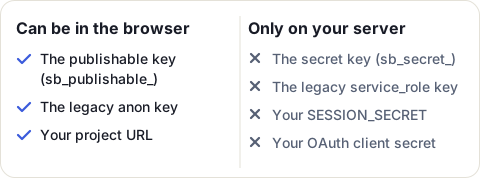
Everything else follows from this. Supabase gives each project two kinds of keys, and each one acts as a Postgres role:
| Key | Starts with | Postgres role | Where it may be |
|---|---|---|---|
| Publishable key (legacy name: anon key) | sb_publishable_ |
anon, or authenticated once a Supabase Auth user is signed in |
Anywhere: the browser, a mobile app, your source code |
| Secret key (legacy name: service_role key) | sb_secret_ |
service_role, which bypasses Row Level Security |
Only your server, in an environment variable |
- The publishable key is public by design. What protects your data is Row Level Security (RLS): with RLS on and no policy, the publishable key reads and writes nothing.
- The secret key skips every RLS policy. Anyone who has it can read and change every row. Supabase refuses it from a browser, but that doesn’t make a leaked key safe: it still works from any other tool.
- The legacy
anonandservice_rolekeys still work, but Supabase is deprecating them by the end of 2026. New code should use the publishable and secret keys, and the files below expect the new secret key (sb_secret_...):db.tsrefuses any other. You find all of them in your project’s Settings > API Keys.
Two ways to handle sign-in
| Your sign-in, Supabase behind your server | Supabase Auth | |
|---|---|---|
| Who keeps the users | Your own users table |
Supabase (auth.users) |
| Who talks to Supabase | Only your server, with the secret key | The browser and your server, with the publishable key |
| What protects each row | Your server’s code, on tables locked to the browser | RLS policies on auth.uid() |
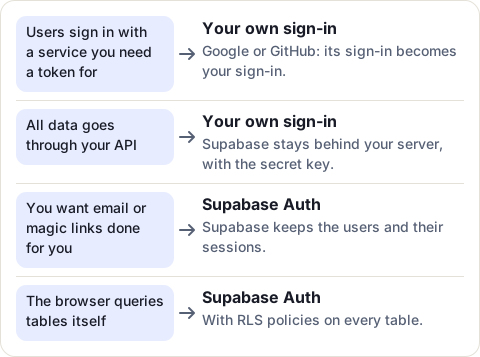
The first way fits well when your app needs a token from the service people sign in with anyway, for example to read their Google Drive or their GitHub repositories: that service’s sign-in becomes your sign-in, and you never store a password.
Way 1: your own sign-in, Supabase on the server only
Using Fastify? The same sign-in as a Fastify plugin reuses these files and adds the hooks and routes.
The code below has no dependency beyond Node’s built-in crypto, and the handlers take a standard Request and return a Response, so they run on any Node.js 22.18+ server or serverless platform.
Step 1: keep the keys in server-only variables
# .env (never committed; commit a .env.example with the names only)
# Server only, except where marked. None of the server-only ones may go in a NEXT_PUBLIC_, VITE_ or PUBLIC_ variable:
# those are sent to the browser.
SUPABASE_URL=https://your-project-ref.supabase.co
SUPABASE_SECRET_KEY=sb_secret_replace_me
# 32 random bytes or more, e.g. the output of: node -e "console.log(require('crypto').randomBytes(32).toString('base64url'))"
SESSION_SECRET=replace_me_with_a_long_random_string
APP_ORIGIN=https://app.example.com
# Way 1: your OAuth app at the provider your users sign in with
OAUTH_CLIENT_ID=replace_me
OAUTH_CLIENT_SECRET=replace_me
# Way 2 only (Supabase Auth): the publishable key may be public
SUPABASE_PUBLISHABLE_KEY=sb_publishable_replace_me
Frameworks send some variables to the browser on purpose: those starting with NEXT_PUBLIC_, VITE_ or PUBLIC_. None of the server-only ones may have such a name: only the publishable key may be public. SESSION_SECRET signs your session cookies: if it leaks, anyone can sign in as anyone, so treat it like the secret key.
Step 2: lock every table
-- tables.sql: the users table, locked so only your server can reach it.
-- Run it in the Supabase SQL Editor, or keep it as a migration (supabase/migrations/0001_users.sql).
create table public.users (
  id               uuid primary key default gen_random_uuid(),
  provider         text not null,          -- e.g. 'google', 'github'
  provider_user_id text not null,          -- the person's id at that provider
  email            text,
  created_at       timestamptz not null default now(),
  last_sign_in_at  timestamptz,
  unique (provider, provider_user_id)      -- one row per person, even if two sign-ins race
);

-- Server only: Row Level Security on, with NO policy. A publishable (anon) key now reads and writes nothing here.
-- The secret key's role, service_role, bypasses RLS, so your server still can.
alter table public.users enable row level security;
revoke all on public.users from anon, authenticated;
grant all on public.users to service_role;

-- The same three lines for every table you add. With many tables, a loop:
do $$
declare t text;
begin
  foreach t in array array['users'] loop    -- list every table here
    execute format('alter table public.%I enable row level security', t);
    execute format('revoke all on public.%I from anon, authenticated', t);
    execute format('grant all on public.%I to service_role', t);
  end loop;
end $$;

-- And for every SQL function you call through /rest/v1/rpc: only the server may run it.
-- revoke execute on function public.my_function(uuid) from public, anon, authenticated;
-- grant execute on function public.my_function(uuid) to service_role;
Three lines per table do the locking. enable row level security with no policy means the publishable key gets nothing. revoke all ... from anon, authenticated removes the default grants as well, so a policy added by mistake later still opens nothing. grant all ... to service_role keeps your server’s access. Do the same for every SQL function you call, or anyone with the publishable key can call it through the API.
Step 3: call Supabase from the server only
// db.ts: every database call of the app, from the server only, with Supabase's secret key.
// Plain fetch to Supabase's REST API (PostgREST), so short-lived functions have no client or pool to keep alive.
// The secret key's role (service_role) bypasses Row Level Security, so this file must never reach a browser.
// Error messages hold the method, path, status and error code, never row values or the server's free text.

export class DbError extends Error {
  readonly status: number;
  readonly code: string | undefined;
  constructor(message: string, status: number, code?: string) {
    super(message);
    this.status = status;
    this.code = code;
  }
}

export interface DbOptions {
  /** https://<project-ref>.supabase.co */
  url?: string;
  /** sb_secret_... (Project Settings > API Keys). Never in a NEXT_PUBLIC_, VITE_ or PUBLIC_ variable. */
  secretKey?: string;
  fetch?: typeof fetch;
}

type Method = 'GET' | 'POST' | 'PATCH' | 'DELETE';

export function createDb(opts: DbOptions = {}) {
  const base = (opts.url ?? process.env.SUPABASE_URL ?? '').replace(/\/$/, '') + '/rest/v1';
  const key = opts.secretKey ?? process.env.SUPABASE_SECRET_KEY ?? '';
  if (!key) throw new Error('SUPABASE_SECRET_KEY is not set');
  // The new secret keys go in the apikey header alone, which is all this file sends: a legacy service_role key is not accepted.
  if (!key.startsWith('sb_secret_')) throw new Error('SUPABASE_SECRET_KEY must be a secret key (sb_secret_...)');
  const f = opts.fetch ?? fetch;

  async function call<T>(method: Method, path: string, o: { query?: Record<string, string>; body?: unknown } = {}): Promise<T> {
    const qs = o.query ? '?' + new URLSearchParams(o.query).toString() : '';
    const headers: Record<string, string> = { apikey: key };
    if (o.body !== undefined) {
      headers['Content-Type'] = 'application/json';
      headers.Prefer = 'return=representation';
    }
    let res: Response;
    try {
      res = await f(base + path + qs, { method, headers, body: o.body === undefined ? undefined : JSON.stringify(o.body) });
    } catch {
      throw new DbError(`Database request failed: ${method} ${path} -> network`, 0, 'network');
    }
    if (!res.ok) {
      let code: string | undefined;
      try {
        code = ((await res.json()) as { code?: string }).code;
      } catch {
        // no JSON body: the status alone is reported
      }
      throw new DbError(`Database request failed: ${method} ${path} -> ${res.status} ${code ?? ''}`.trim(), res.status, code);
    }
    const text = await res.text();
    return (text ? JSON.parse(text) : undefined) as T;
  }

  const eq = (v: string): string => `eq.${v}`;

  return {
    /** The app's user for this sign-in, created the first time. Returns its id (the users table in tables.sql). */
    async upsertUser(input: { provider: string; providerUserId: string; email: string | null }): Promise<string> {
      const now = new Date().toISOString();
      const match = { provider: eq(input.provider), provider_user_id: eq(input.providerUserId) };
      const found = await call<{ id: string }[]>('GET', '/users', { query: { ...match, select: 'id', limit: '1' } });
      if (found[0]) {
        await call('PATCH', '/users', { query: match, body: { last_sign_in_at: now, ...(input.email ? { email: input.email } : {}) } });
        return found[0].id;
      }
      const created = await call<{ id: string }[]>('POST', '/users', {
        body: { provider: input.provider, provider_user_id: input.providerUserId, email: input.email, last_sign_in_at: now },
      });
      return created[0]!.id;
    },
  };
}

export type Db = ReturnType<typeof createDb>;
Every database call of the app goes through this one file, which is the only place that holds the secret key. It uses plain fetch to Supabase’s REST API rather than a client library: there is nothing to configure, and no client or connection pool to keep alive in short-lived functions. If you prefer @supabase/supabase-js, create its client with the secret key in the same file and nowhere else.
Because the secret key bypasses RLS, your code is now the lock: every query must be limited to the signed-in user, as upsertUser is to the provider’s user id.
Step 4: sign the session cookie
// session.ts: a signed session cookie. Server only.
// The cookie holds base64url(JSON payload) + "." + base64url(HMAC-SHA256 of that payload, keyed with SESSION_SECRET).
// Anyone can read the payload, nobody can change it without the secret, and it expires on its own.
import { createHmac, timingSafeEqual } from 'node:crypto';

// The __Host- prefix makes browsers refuse the cookie unless it is Secure, has Path=/ and has no Domain, so no other
// subdomain can set or replace it (MDN, Set-Cookie, read 2026-11-22).
export const SESSION_COOKIE = '__Host-session';
export const SESSION_TTL_MS = 30 * 24 * 60 * 60 * 1000; // 30 days

export interface Session {
  userId: string;
  /** Unix time in milliseconds. */
  expiresAt: number;
}

// Read at call time, so tests can pass their own secret. A short secret is refused: it can be guessed offline.
const secretOf = (secret?: string): string => {
  const s = secret ?? process.env.SESSION_SECRET;
  if (!s) throw new Error('SESSION_SECRET is not set');
  if (Buffer.byteLength(s) < 32) throw new Error('SESSION_SECRET must be at least 32 bytes');
  return s;
};
const mac = (part: string, secret: string): Buffer => createHmac('sha256', secret).update(part).digest();

export function signSession(session: Session, secret?: string): string {
  const part = Buffer.from(JSON.stringify({ userId: session.userId, expiresAt: session.expiresAt })).toString('base64url');
  return `${part}.${mac(part, secretOf(secret)).toString('base64url')}`;
}

/** The session, or null for a bad format, a bad signature or an expired session. Never throws on bad input. */
export function verifySession(value: unknown, nowMs: number, secret?: string): Session | null {
  if (typeof value !== 'string') return null;
  const dot = value.indexOf('.');
  if (dot <= 0 || dot !== value.lastIndexOf('.')) return null;
  const part = value.slice(0, dot);
  const sig = value.slice(dot + 1);
  if (!/^[A-Za-z0-9_-]+$/.test(part) || !/^[A-Za-z0-9_-]+$/.test(sig)) return null;

  const given = Buffer.from(sig, 'base64url');
  const expected = mac(part, secretOf(secret));
  // timingSafeEqual throws on different lengths, so compare the lengths first (a length is not secret).
  if (given.length !== expected.length || !timingSafeEqual(given, expected)) return null;

  let parsed: unknown;
  try {
    parsed = JSON.parse(Buffer.from(part, 'base64url').toString('utf8'));
  } catch {
    return null;
  }
  if (typeof parsed !== 'object' || parsed === null) return null;
  const { userId, expiresAt } = parsed as Record<string, unknown>;
  if (typeof userId !== 'string' || userId === '') return null;
  if (typeof expiresAt !== 'number' || !Number.isFinite(expiresAt) || expiresAt <= nowMs) return null;
  return { userId, expiresAt };
}

/** The Set-Cookie value: HttpOnly (no script can read it), Secure (HTTPS only), SameSite=Lax (not sent on cross-site POSTs). */
export function sessionCookie(value: string, session: Session, nowMs: number): string {
  const maxAge = Math.max(0, Math.floor((session.expiresAt - nowMs) / 1000));
  return `${SESSION_COOKIE}=${value}; HttpOnly; Secure; SameSite=Lax; Path=/; Max-Age=${maxAge}`;
}

export function clearSessionCookie(): string {
  return `${SESSION_COOKIE}=; HttpOnly; Secure; SameSite=Lax; Path=/; Max-Age=0`;
}

/** One cookie from the request's Cookie header, or null. */
export function readCookie(request: Request, name: string): string | null {
  for (const part of (request.headers.get('cookie') ?? '').split(';')) {
    const [k, ...v] = part.trim().split('=');
    if (k !== name) continue;
    try {
      return decodeURIComponent(v.join('='));
    } catch {
      return null; // a malformed escape is not a cookie of ours
    }
  }
  return null;
}
The session is the cookie itself: the user’s id and an expiry, signed with your SESSION_SECRET, which must be at least 32 bytes long: the code refuses a shorter one. Nothing is stored on the server, so there is no session table to clean up. The cookie’s three flags and its name each close a door:
- HttpOnly: no script on the page can read it, so a cross-site scripting bug can’t steal it.
- Secure: it is only sent over HTTPS.
- SameSite=Lax: it isn’t sent on a POST from another site, but it is sent when a link from another site opens yours. That keeps people signed in when they follow a link to your app. The same flag lets the state cookie of the next step reach the sign-in callback, which the provider opens with a redirect.
- The
__Host-name prefix: the browser only accepts the cookie if it is Secure, hasPath=/and has noDomain, so no other subdomain of yours can set or replace it.
Step 5: sign people in with OAuth
The sign-in sends the person to the provider’s consent page, then back to your callback with a one-time code. The state makes sure the callback answers a sign-in that your site started, in this browser. PKCE ties the code to this sign-in: the server sends a hash of a random secret at the start, and the secret itself when it trades the code, so a stolen code is useless. Most providers support it; if yours doesn’t, the state check still stops login CSRF. The standard asks for this: clients “MUST prevent authorization code injection attacks” (RFC 9700, section 2.1.1), and recommends PKCE for that.
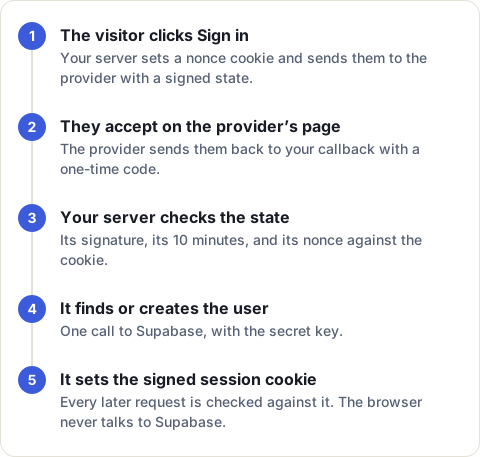
// oauth-state.ts: the `state` and the PKCE verifier of an OAuth sign-in. Server only.
// Three checks, so a forged callback fails whichever way it is made:
//  1. the state is signed (HMAC-SHA256 with SESSION_SECRET) and expires after 10 minutes;
//  2. its random nonce must equal the nonce in a short-lived HttpOnly cookie set when the sign-in started,
//     which ties the callback to the browser that began it (login CSRF);
//  3. PKCE (S256): the provider gets a hash of a random secret (the challenge) at the start, and the secret itself (the
//     verifier, kept in a cookie like the nonce) when the code is traded, so a stolen code is useless without it.
//     RFC 9700 section 2.1.1: clients must prevent authorization code injection, and PKCE is recommended for
//     confidential clients too (https://www.rfc-editor.org/rfc/rfc9700.html, read 2026-11-22).
// The HMAC input starts with a fixed label, so a state can never pass as a session cookie, nor the other way round.
import { createHash, createHmac, randomBytes, timingSafeEqual } from 'node:crypto';

export const STATE_TTL_MS = 10 * 60 * 1000;
export const STATE_COOKIE = 'oauth_state';
export const VERIFIER_COOKIE = 'oauth_verifier';
const LABEL = 'oauth-state-v1\n';

const secretOf = (secret?: string): string => {
  const s = secret ?? process.env.SESSION_SECRET;
  if (!s) throw new Error('SESSION_SECRET is not set');
  if (Buffer.byteLength(s) < 32) throw new Error('SESSION_SECRET must be at least 32 bytes');
  return s;
};
const mac = (part: string, secret: string): Buffer => createHmac('sha256', secret).update(LABEL + part).digest();

export const newNonce = (): string => randomBytes(18).toString('base64url');

/** The PKCE verifier: 32 random bytes, 43 characters (RFC 7636 asks for 43 to 128). */
export const newVerifier = (): string => randomBytes(32).toString('base64url');
/** The PKCE challenge sent to the provider: the S256 hash of the verifier (RFC 7636 section 4.2). */
export const challengeOf = (verifier: string): string => createHash('sha256').update(verifier).digest('base64url');

export function signState(nonce: string, expiresAt: number, secret?: string): string {
  const part = Buffer.from(JSON.stringify({ n: nonce, e: expiresAt })).toString('base64url');
  return `${part}.${mac(part, secretOf(secret)).toString('base64url')}`;
}

/** The state's nonce, or null for a bad format, a bad signature or an expired state. Never throws. */
export function verifyState(value: unknown, nowMs: number, secret?: string): string | null {
  if (typeof value !== 'string') return null;
  const dot = value.indexOf('.');
  if (dot <= 0 || dot !== value.lastIndexOf('.')) return null;
  const part = value.slice(0, dot);
  const sig = value.slice(dot + 1);
  if (!/^[A-Za-z0-9_-]+$/.test(part) || !/^[A-Za-z0-9_-]+$/.test(sig)) return null;
  const given = Buffer.from(sig, 'base64url');
  const expected = mac(part, secretOf(secret));
  if (given.length !== expected.length || !timingSafeEqual(given, expected)) return null;
  let parsed: unknown;
  try {
    parsed = JSON.parse(Buffer.from(part, 'base64url').toString('utf8'));
  } catch {
    return null;
  }
  if (typeof parsed !== 'object' || parsed === null) return null;
  const { n, e } = parsed as Record<string, unknown>;
  if (typeof n !== 'string' || n === '') return null;
  if (typeof e !== 'number' || !Number.isFinite(e) || e <= nowMs) return null;
  return n;
}

// These cookies are only sent to the sign-in routes: nothing else needs them.
export const stateCookie = (nonce: string): string =>
  `${STATE_COOKIE}=${nonce}; HttpOnly; Secure; SameSite=Lax; Path=/api/auth; Max-Age=${STATE_TTL_MS / 1000}`;
export const clearStateCookie = (): string => `${STATE_COOKIE}=; HttpOnly; Secure; SameSite=Lax; Path=/api/auth; Max-Age=0`;
export const verifierCookie = (verifier: string): string =>
  `${VERIFIER_COOKIE}=${verifier}; HttpOnly; Secure; SameSite=Lax; Path=/api/auth; Max-Age=${STATE_TTL_MS / 1000}`;
export const clearVerifierCookie = (): string => `${VERIFIER_COOKIE}=; HttpOnly; Secure; SameSite=Lax; Path=/api/auth; Max-Age=0`;
Then the three routes: start, callback and sign-out.
// auth-routes.ts: sign in with an OAuth provider, keep the person in a signed cookie, sign out. Server only.
// Web-standard Request/Response handlers: they run on any Node.js 22.18+ server or serverless platform.
// The provider is any OAuth 2.0 service your users already have (Google, GitHub, Microsoft and others work the same way).
import type { Db } from './db.ts';
import {
  newNonce, newVerifier, challengeOf, signState, verifyState,
  stateCookie, clearStateCookie, verifierCookie, clearVerifierCookie, STATE_COOKIE, VERIFIER_COOKIE, STATE_TTL_MS,
} from './oauth-state.ts';
import { signSession, sessionCookie, clearSessionCookie, readCookie, SESSION_TTL_MS } from './session.ts';

/** What the routes need from the provider: its consent page, and the person behind a code. */
export interface OAuthProvider {
  name: string;
  /**
   * The provider's consent page URL, with your client id, redirect URI, scopes and this state.
   * Add code_challenge=<codeChallenge> and code_challenge_method=S256 (PKCE).
   */
  authorizeUrl(state: string, codeChallenge: string): string;
  /** Exchanges the code for a token, then reads who signed in. Send code_verifier=<codeVerifier> in the token request. */
  identify(code: string, codeVerifier: string): Promise<{ providerUserId: string; email: string | null }>;
}

export interface AuthDeps {
  db: Pick<Db, 'upsertUser'>;
  provider: OAuthProvider;
  /** Your site's origin, e.g. https://app.example.com: POSTs must come from it. */
  appOrigin: string;
  now?: () => number;
}

function redirect(location: string, cookies: string[]): Response {
  const headers = new Headers({ location, 'cache-control': 'no-store' });
  for (const c of cookies) headers.append('set-cookie', c);
  return new Response(null, { status: 302, headers });
}

/** GET /api/auth/start: to the provider's consent page, with a signed state and PKCE challenge; their secrets go in cookies. */
export function handleStart(deps: AuthDeps): Response {
  const now = (deps.now ?? Date.now)();
  const nonce = newNonce();
  const verifier = newVerifier();
  const url = deps.provider.authorizeUrl(signState(nonce, now + STATE_TTL_MS), challengeOf(verifier));
  return redirect(url, [stateCookie(nonce), verifierCookie(verifier)]);
}

/** GET /api/auth/callback?code&state: check the state and the PKCE verifier, find or create the user, set the session cookie. */
export async function handleCallback(request: Request, deps: AuthDeps): Promise<Response> {
  const now = (deps.now ?? Date.now)();
  const q = new URL(request.url).searchParams;
  // Every way out of the callback clears both cookies: each sign-in attempt gets one try.
  const back = (code: string): Response => redirect(`/?error=${code}`, [clearStateCookie(), clearVerifierCookie()]);
  if (q.get('error')) return back('denied'); // the person said no on the provider's page

  const nonce = verifyState(q.get('state'), now);
  const code = q.get('code');
  const verifier = readCookie(request, VERIFIER_COOKIE);
  if (!nonce || nonce !== readCookie(request, STATE_COOKIE) || !code || !verifier) return back('bad_state');

  try {
    const who = await deps.provider.identify(code, verifier);
    const userId = await deps.db.upsertUser({ provider: deps.provider.name, providerUserId: who.providerUserId, email: who.email });
    const session = { userId, expiresAt: now + SESSION_TTL_MS };
    return redirect('/app', [sessionCookie(signSession(session), session, now), clearStateCookie(), clearVerifierCookie()]);
  } catch {
    return back('signin_failed'); // log the error on your side; never show its text to the visitor
  }
}

/** POST /api/auth/logout: clears the cookie. There is nothing to revoke on the server: the cookie was the session. */
export function handleLogout(request: Request, deps: AuthDeps): Response {
  if (request.method !== 'POST') return new Response(null, { status: 405, headers: { allow: 'POST' } });
  if (request.headers.get('origin') !== deps.appOrigin) return new Response(null, { status: 403 });
  return new Response(null, { status: 204, headers: { 'set-cookie': clearSessionCookie() } });
}authorizeUrlandidentifyare the only parts that depend on the provider. Write them from its OAuth documentation: the consent page URL with your client id, redirect URI, scopes, the state and thecode_challenge(withcode_challenge_method=S256), then the token exchange, which sends thecode_verifier, and the call that says who signed in.- The callback creates the user the first time and updates
last_sign_in_atafter that. Two first sign-ins at the same moment still create only one user, because of theunique (provider, provider_user_id)constraint from step 2: the second request fails, and the person can sign in again. - On any error, the visitor goes back with a short code such as
bad_state. A callback without its verifier cookie is abad_statetoo. Log the real error on your side, but never show its text: it can hold values from the database or the provider. - Signing out clears the cookie in this browser only: a copied cookie stays valid until it expires. To sign everyone out, change
SESSION_SECRET.
Step 6: check the session on every request
// require-session.ts: the check at the top of every API route that needs a signed-in person. Server only.
// For any method other than GET and HEAD the Origin must also be your site (with the SameSite=Lax cookie, this stops cross-site
// requests, CSRF). The Origin is checked first, so a cross-site request learns nothing about who is signed in.
import { readCookie, verifySession, SESSION_COOKIE, type Session } from './session.ts';

const json = (body: unknown, status: number): Response =>
  new Response(JSON.stringify(body), { status, headers: { 'content-type': 'application/json', 'cache-control': 'no-store' } });

export function requireSession(request: Request, appOrigin: string, nowMs = Date.now()): Session | Response {
  const mutating = request.method !== 'GET' && request.method !== 'HEAD';
  if (mutating && request.headers.get('origin') !== appOrigin) return json({ error: 'bad_origin' }, 403);
  return verifySession(readCookie(request, SESSION_COOKIE), nowMs) ?? json({ error: 'not_signed_in' }, 401);
}

// Use it like this. Every query is scoped to the session's user by your code, because the secret key bypasses RLS.
//
// export async function GET(request: Request): Promise<Response> {
//   const session = requireSession(request, process.env.APP_ORIGIN!);
//   if (session instanceof Response) return session;
//   const projects = await db.listProjects(session.userId);
//   return json({ projects }, 200);
// }
Put requireSession first in every route that needs a signed-in person. A request that changes something (any method other than GET and HEAD) must also come from your own site: together with the SameSite cookie, that stops another site from making requests in your users’ name.
Way 2: Supabase Auth with Row Level Security
If you’d rather have Supabase keep your users, the browser signs in with Supabase Auth and queries the tables itself, with the publishable key. Row Level Security policies are then the only lock, so every table needs them:
-- rls-policies.sql: with Supabase Auth, the browser queries tables itself, so RLS policies are the lock.
-- Each row belongs to one user (user_id). A signed-in user reads and changes only their own rows; anon gets nothing.
create table public.notes (
  id         bigint generated always as identity primary key,
  user_id    uuid not null default auth.uid() references auth.users (id) on delete cascade,
  body       text not null,
  created_at timestamptz not null default now()
);
create index notes_user_id_idx on public.notes (user_id);   -- policies filter on it: index it

alter table public.notes enable row level security;

-- Grants decide whether a role may run an operation on the table at all; policies then pick the rows. Not every project
-- grants these by default, and a missing grant fails with error 42501 before any policy runs.
-- (https://supabase.com/docs/guides/database/postgres/row-level-security, read 2026-11-22)
revoke all on public.notes from anon;
grant select, insert, update, delete on public.notes to authenticated;

-- (select auth.uid()) instead of auth.uid(): Postgres runs it once per query, not once per row.
create policy "Users read their own notes" on public.notes
  for select to authenticated using ((select auth.uid()) = user_id);

create policy "Users add their own notes" on public.notes
  for insert to authenticated with check ((select auth.uid()) = user_id);

create policy "Users change their own notes" on public.notes
  for update to authenticated using ((select auth.uid()) = user_id) with check ((select auth.uid()) = user_id);

create policy "Users delete their own notes" on public.notes
  for delete to authenticated using ((select auth.uid()) = user_id);
(select auth.uid()) is the user’s id from their session token. Supabase recommends writing it inside select, so Postgres works it out once per query instead of once per row, and indexing the column the policies compare it with.
The revoke and grant lines come first for a reason: grants decide whether a role may run an operation on the table at all, and policies then pick the rows. A missing grant fails with error 42501 before any policy runs, so if a request that should work is refused, check the grants before you change a policy.
On the server (server-side rendering, API routes), read the session from cookies with @supabase/ssr:
// supabase-auth-server.ts: the other way, with Supabase Auth holding your users. Server side.
// npm install @supabase/supabase-js @supabase/ssr
// @supabase/ssr keeps the Supabase session in cookies, so your server can read who is signed in.
// This uses the PUBLISHABLE key (sb_publishable_...): the browser has it too, and RLS policies decide what each user may touch.
import { createServerClient, parseCookieHeader, serializeCookieHeader } from '@supabase/ssr';

/** A Supabase client for one request. Cookies it refreshes are written to `responseHeaders`. */
export function supabaseFor(request: Request, responseHeaders: Headers) {
  return createServerClient(process.env.SUPABASE_URL!, process.env.SUPABASE_PUBLISHABLE_KEY!, {
    cookies: {
      getAll() {
        return parseCookieHeader(request.headers.get('cookie') ?? '').map(({ name, value }) => ({ name, value: value ?? '' }));
      },
      setAll(cookiesToSet, headers) {
        for (const { name, value, options } of cookiesToSet) {
          responseHeaders.append('set-cookie', serializeCookieHeader(name, value, options));
        }
        // Cache headers from Supabase, so a CDN never stores a response that sets someone's session cookie.
        for (const [key, value] of Object.entries(headers)) responseHeaders.set(key, value);
      },
    },
  });
}

/**
 * The signed-in user's id, or null. getClaims() checks the token's signature, so it is safe to trust on the server.
 * Never trust getSession() on the server: it reads the cookie without checking it again.
 */
export async function currentUserId(request: Request, responseHeaders: Headers): Promise<string | null> {
  const { data, error } = await supabaseFor(request, responseHeaders).auth.getClaims();
  if (error || !data) return null;
  return data.claims.sub;
}
Two rules from Supabase’s docs matter most here:
- Use
getClaims()to protect pages and data on the server. It checks the token’s signature on every call, locally on new projects, which use asymmetric signing keys. - Never trust
getSession()in server code. It reads the session from the cookie without checking it again, so a changed cookie would pass.
This code follows Supabase’s docs as read on 22 November 2026, and it typechecks against @supabase/ssr 0.12.7 and @supabase/supabase-js 2.119.2.
Mistakes that leak data
- The secret key in a browser variable. A
NEXT_PUBLIC_SUPABASE_SERVICE_ROLE_KEYis sent to every visitor. If it ever was, treat the key as leaked and replace it, following Supabase’s guide to rotating leaked API keys. - A table without RLS. With the publishable key in your page, anyone can read and change that table. Turn RLS on for every table, even the ones only your server uses.
- A policy that forgets the user.
using (true)opens the table to every signed-in user, not only to the row’s owner. getSession()to protect a page on the server. UsegetClaims().- A query that trusts an id from the request. With the secret key there is no RLS to catch it: always take the user’s id from the verified session, never from the URL or the body.
How this code is tested
Every file in this guide is run by a test suite before it is published. The tests sign a session and read it back; change one character of the cookie and check it is refused; expire it; refuse a SESSION_SECRET under 32 bytes; check the PKCE challenge against the example in RFC 7636; send a callback whose state doesn’t match its cookie, and one without its verifier cookie; and check that the database helper accepts only a secret key, sends it in the apikey header and never puts a row’s values in an error message.
Sources
- Supabase Docs: API keys, read 22 November 2026
- Supabase Docs: Row Level Security, read 22 November 2026
- Supabase Docs: Creating a Supabase client for SSR, read 22 November 2026
- Supabase Docs: Server-Side Rendering, read 22 November 2026
- Supabase Docs: JavaScript reference, getClaims, read 22 November 2026
- MDN: Set-Cookie header, read 22 November 2026
- RFC 9700: Best Current Practice for OAuth 2.0 Security, read 22 November 2026
- RFC 7636: Proof Key for Code Exchange (PKCE), read 22 November 2026
- Node.js 22.18.0 release notes, read 22 November 2026
Frequently asked questions
Is it safe to put the Supabase anon key in the browser?
Yes. The anon key, now called the publishable key, is made to be public. It is only safe while every table has Row Level Security turned on: with RLS on and no policy, that key reads and writes nothing.
Where do I find the Supabase service role key?
In your project's Settings > API Keys. Supabase now calls it a secret key, starting with sb_secret_. The service_role key is the legacy version, which Supabase is deprecating by the end of 2026.
Does the service role key bypass Row Level Security?
Yes. The secret key and the legacy service_role key use the service_role Postgres role, which skips every RLS policy. That is why it must only ever be on your server.
Can I use Row Level Security without Supabase Auth?
Yes. Turn RLS on with no policy and revoke the anon and authenticated roles: the browser gets nothing, and your server reaches the tables with the secret key. Your own code then decides which rows each user may see.
Should I use getSession or getClaims on the server?
getClaims. Supabase says never to trust getSession in server code, because it reads the session from the cookie without checking it again. getClaims checks the token's signature on every call.